
Autoconocimiento


30 minutos

-
Una hoja de papel A4
-
Marcadores de diferentes colores
-
Post-its
¿Qué es esta herramienta y cuál es su propósito y beneficio?
Los mapas mentales suelen usarse para generar nuevas ideas basándose en las anteriores. Mapeando la mente utiliza esta herramienta para el autodescubrimiento. La primera capa se crea a partir de ideas sobre quién eres. Estas generan nuevas ideas relacionadas, formando capas adicionales. Esta herramienta te ayuda a identificar nuevos aspectos de ti mismo mientras mantienes la mente relajada. Esto puede conducir a descubrimientos personales beneficiosos para tu trayectoria profesional.
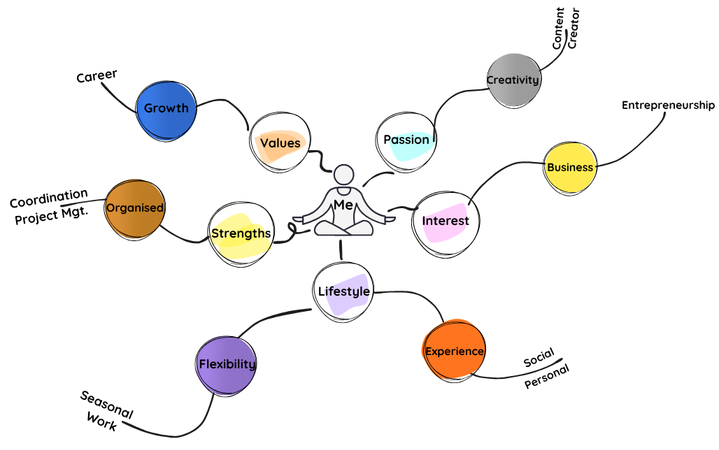
Los pasos para usar esta herramienta
PASO 1
Escribe tu nombre en el centro de un papel y luego dibuja un círculo alrededor. También podrías dibujar una imagen tuya o adjuntar una foto.
PASO 2
Añade una primera capa de ideas sobre quién eres alrededor del círculo central. Estas deberían ser palabras que usarías para describirte a alguien. Por ejemplo, podrías usar palabras como 'apasionado', 'preciso', 'pintor', 'amante de la música' y 'solucionador de problemas'.
Puedes elegir categorías como tu identidad personal, valores, creencias, fortalezas, capacidades, pasiones, intereses, estilo social, estilo cognitivo y de trabajo, aspectos relacionados con el estilo de vida y la carrera, cultura, contexto y entorno, y experiencias. También puedes añadir tus propias categorías.
Usa notas post-its de diferentes colores para ideas. Son fáciles de mover según sea necesario.
PASO 3
Construye sobre cada elemento de tu primera capa de ideas. Empieza a añadir más ideas a cada uno. Organízalos en ramas como un árbol.
PASO 4
Añade algunas capas más de forma similar, siempre construyendo sobre ideas previas y desglosándolas en descripciones más detalladas de ti mismo. Esto crea múltiples capas de descripciones e ideas sobre quién eres, organizadas por temas principales.
PASO 5
Cuando estés listo, mira tu mapa mental. Las ideas representan diferentes aspectos de ti mismo. ¿Qué nuevos aspectos de ti puedes identificar? ¿Hay algo sorprendente?
PASO 6
También puedes combinar ideas existentes para generar nuevas ideas. ¿Qué nuevos aspectos de ti emergen de este proceso?
PASO 7
Rodea los diez aspectos que creas que mejor te describen.
PASO 8
Reflexiona sobre cómo crear este mapa mental ha aumentado tu autocomprensión.

Consejos y sugerencias para usar esta herramienta
-
Puedes seguir desarrollando el mapa mental durante varios días, revisitándolo cada vez que surja una nueva idea o intuición.
-
Guarda los resultados de esta herramienta para combinarlos con otras fases del kit de herramientas Career Compass.
-
Aunque se prefieren papel y rotuladores para esta herramienta, también se pueden utilizar aplicaciones de mapas mentales en línea.
Ejemplos de herramientas digitales de mapeo mental de acceso abierto:
MindMup
MindMup es una herramienta basada en navegador que es muy fácil de usar y es ideal para hacer lluvia de ideas rápidas y planificar ensayos. La versión gratuita es suficiente para actividades en el aula
Coggle
Esta es una herramienta visual e intuitiva que permite la colaboración en tiempo real. El nivel gratuito soporta mapas mentales básicos y es genial para trabajo en grupo
FreeMind
FreeMind es completamente de código abierto y funciona sin conexión. Es mejor para estudiantes mayores o aulas centradas en la privacidad.
GitMind
GitMind tiene una interfaz limpia con plantillas para lluvia de ideas y planificación. La versión gratuita es fácil de usar y adecuada para estudiantes.
Canva
Canva ofrece plantillas gratuitas de mapas mentales con un gran atractivo visual. Es bueno para presentaciones y trabajos creativos (se requiere inicio de sesión).
MindMeister
MindMeister es una herramienta educativa popular con una interfaz sencilla. El plan gratuito permite un número limitado de mapas y es adecuado para actividades cortas.
Otras herramientas de esta fase

Mapear y comparar la experiencia de ti mismo por parte de los demás y de ti mismo

Una autodocumentación de actitudes, comportamientos, creencias y miedos

Una descripción visual de uno mismo

Encontrar la causa la autoconfianza

6 preguntas para entender las fuentes de motivación

Visualizando los principales acontecimientos de la vida

Visualización de culturas personales y circundantes